Author Archive

Garage Band loop browser acting up

This is not so much a development issue as just a general usability issue, but it had frustrated me for a while and I am glad I got the issue behind me.

The problem was that my Garage Band v6 (2011 version) had some problems with the loops. When I would fire up the program, some of the loops in the loop browser showed up sort of grayed out with an arrow next to them. When I click on one of the grayed arrowed loops, I would get a message about how I needed to use Software Update to download the loops onto my computer. However, when I would go to Software Update, it would insist that there were no updates available. Also, when I went back into Garage Band to do the same thing again, it would respond with this message:

You have already initiated the installation of additional content for GarageBand via Software Update. For additional information please open the ‘Software Update’ application.

The battle of wits has begun.

Finally after trying to uninstall and reinstall a couple of times, and after looking through umpteen dozen posts on how this fixed it or that fixed it, I came upon this post on Apple’s web site:

Update the loop library (this link is dead as of 2/23/2012)

Finally I have slain the ROUS that was my loop browser issue.

EDIT:

The link above appears to be dead as of February 23, 2012, a quick Google search for “update the loop library” with specifying the site of apple.com yielded this link on Apple’s web site:

Update the loop library (http://support.apple.com/kb/PH1936) (this link is dead as of 1/8/2017)

I do not recall the exact contents of the now dead link, but from what I remember, I think that link and this one recommended very similar steps of actions.
objc_msgSend EXC_BAD_ACCESS error after moving operations to a GCD block

The subject says it all. After trying to improve the responsiveness of my app by using a Grand Central Dispatch block to run some code asynchronously, the code in my main queue GCD block was failing with an objc_msgSend EXC_BAD_ACCESS error. Bugger.

The error itself typically describes sending a message to an object that has been released and is no longer valid, but I am not sure how that could have happened just by moving some operations inside of GCD blocks.

The way that I fixed this was to go into the diagnostics tab in the Edit Scheme window, and I turned on the Enabled Guard Malloc option. Then, when I ran the app, it showed me more specifically where the issue was. The problem turned out to be that I was using an autorelease array that was becoming invalid as a result of going into and coming out of the GCD blocks. I switched the array to a retained object, and everything started working fine again.

Just don’t forget to turn off the Enable Guard Malloc when you are done testing.

And if you have not yet checked out the coolness of Grand Central Dispatch, you are missing out on a valuable tool.

UILabel sizeToFit malfunction

For some reason, my use of UIView’s sizeToFit method was not working as expected. What I got when I tried to send my UILabel controls through this method was that they ended up being sized down too far, and as a result text was either eliminated from the label, or an ellipsis appeared at the end. I tried just about every combination of UILineBreakMode and numberOfLines I could think of, with no combination fixing the problem.

So what I ended up doing was to just manipulate the UILabel’s frame in the table view’s cellForRowAtIndexPath method. Here is a code snippet:

if (feedIndex == SECTION_CUSTOMER_AND_JOB_INFO) 
{
    UITableViewCell *cell = [tableView dequeueReusableCellWithIdentifier:CELL_CUSTOMER_AND_JOB_INFO];
 
    if (cell == nil) 
    {
        [[NSBundle mainBundle] loadNibNamed:@"SummaryCustomerAndJobInfoCell" owner:self options:NULL];
        cell = cellCustomerAndJobInfo;
    }
 
    // the next line uses the tag property of the label as set in the nib file
    UILabel *lbl = (UILabel *)[cell viewWithTag:1];
 
    NSString *text = @"Set your multiple line\ntext to display here...";
    CGSize constraint = CGSizeMake(lbl.frame.size.width, 20000.0f);
    CGSize size = [text sizeWithFont:lbl.font constrainedToSize:constraint
                       lineBreakMode:UILineBreakModeWordWrap];
 
    lbl.text = text;
    [lbl setFrame:CGRectMake(lbl.frame.origin.x, lbl.frame.origin.y, 
                                      lbl.frame.size.width, size.height)];
 
    return cell;
}

By the way, don’t forget to do the same kind of size calculations in your heightForRowAtIndexPath delegate method.

This past Wednesday was a day of great sadness for me, as I had to put my 15 year old schipperke to sleep. Good bye Captain Kirk, you were an ornery little cuss but we loved you anyway. :'(

Just being thorough

I always get a little nauseous when looking through someone else’s code and seeing things like this:

res = sqlite3_exec(database, [select UTF8String], NULL, NULL, &errorMsg);
if (res != outcome) {
    [testStringCapture appendFormat:@"%@,",obj]; //changed 2/2/2011
}
else {
    [testStringCapture appendFormat:@"%@,",obj]; //changed 2/2/2011
}

Alas, a little later on in the same method was some code that soothed my sensibilities as it is kind a perfect fit into the whole “do something here” theme:

res1 = sqlite3_exec(database, [select1 UTF8String], NULL, NULL, &errorMsg1);
if (res1 != outcome1) {
 
}
else {
 
}

As per usual, these code snippets are unedited (except for some formatting) portions of production code.

Search bar and correction don’t play nice together

I just discovered something about the iOS platform that may not be readily apparent at first glance.

If you are using textDidChange method of a UISearchBar to interactively scan through your table’s data source (and let’s face it, who using the UISearchBar isn’t??), and you have the correction property of the search bar set to anything other than no, your textDidChange method can fire unexpectedly with a different searchTerm than you had expected, which can cause your table data to be out of sync.

BTW, Happy Mother’s Day to all mothers out there.

And an extra special Happy Birthday message to Joe Bonamassa. If you do not know who Joe Bonamassa is, feel shame for a few minutes, then go to iTunes, Amazon, Pandora, or wherever it is that you get music, punch up some of Joe’s music, and then turn it up loud. You’ll thank me later.

Stir Trek: Thor Edition, May 6, 2011

Today was the eagerly awaited Stir Trek event. I met some former co-workers at the Starbucks before the conference began, and then made my way over to the Marcus Crosswoods for the start of the conference.

The sessions were heavily .NET related, as you would expect from a conference put on by .NET folks. The sessions I attended were What’s new in ASP.NET MVC 3, NuGet, and MvcScaffolding by Jon Galloway, Github: Social Coding meets Enterprise Version Control by Joe O’Brien, A Crash Course in Windows Phone 7 Programming by Jesse Liberty, Multiplatform Physics games with Corona by Josh Smith, and Mobile Smackdown featuring Twitter apps courtesy of Jeff Fansler, Chris Judd, Justin Munger.

Following the sessions was a screening of the movie Thor. As one of my former co-workers tweeted after the movie, “What thor lacks in quality it makes up in volume”.

And by the way, thanks to all of you who downloaded my Stir Trek iPhone app (link redacted, app has been removed from the App Store). It was a quick and fun project to do.

Xcode 4 exception breakpoint

Did you ever have Objective-C code that would fail with an exception (such as asking for an objectAtIndex beyond the bounds of the array), but by the time you got word of it, all the stack trace had in it was the obj_msgsend and main? Yeah, I hate that.

Well I discovered that you can add a breakpoint to your project that will immediately break when the exception happens. To do this with Xcode 4, click on the Breakpoints symbol (2nd from the right) in the Navigator pane, click the + button at the bottom of the pane, and select Add Exception Breakpoint. From the bubble that appears, I selected Objective-C from the Exception choice (although I suspect you can safely leave it at all if you desire), and I left the Break selection at On Throw. Once you click Done, you should then have a new exceptions breakpoint in the list.

This was instrumental in helping me track down an issue on an app rescue that I am currently working on.

By the way, here is an awesome line of code that I found in the aforementioned app rescue. My brain hurts from looking at the code for long stretches of time, but there are some nice nuggets like this sprinkled in the code:

Assets *ass = [[Assets alloc]init];

[myTrustyMacBookPro release]; // and “Rawhide in A”

I have to hand it to Apple, they really did a nice job with the Mac OS X Migration Assistant.

I decided that my battle tested MacBook Pro has had enough after 3 years of torture, and so I ambled down to the local Micro Center to pick up a shiny new 21.5″ iMac. Being the lazy developer type that I am, I decided to try and look into using the Migration Assistant so that I would not have to take out an external hard drive or USB memory stick to manually move lots of files from the old MacBook to the iMac.

The first attempt to use Migration Assistant did not go as smoothly as I had hoped. Since both machines were on the same wireless router, I first tried to use the wireless option for communications in the Migration Assistant. Bad move, the time for completion was fluctuating between 20 to 24 hours.

And of course, as I started to look at using Firewire, I discovered that the iMac has a Firewire 800 port, while the 2008 MacBook Pro has a Firewire 400 port. Back to the venerable Micro Center for a supporting cable.

Once I set up the Migration Assistant to run over Firewire, the estimated completion time never went over 50 minutes or so. I went downstairs to watch a bit of TV, and when I came back up a couple hours later, it was finished.

So I rebooted the iMac, and lo and behold, all of my stuffs from the MacBook Pro were on the iMac. Genius! (Bar???)

OK, now to the rant part of this post. That would be the “Rawhide in A” comment you see in this post’s title.

To my Yahoo e-mail address comes this message from some kind of guitar web site. In it, they have some news story on their web site that describes the top 20 movie scenes featuring guitar playing. I can’t pass that up, since I really like movies and I really, really like guitars.

In at number 3 on the list is the Bob’s Country Bunker scene from “The Blues Brothers”, and since I am pretty sure that it is a law in the United States that you have to watch any Good Ole Boys or Bob’s Country Bunker scene whenever the chance is presented to you, I click the YouTube link for the scene and start watching the 2 minute clip.

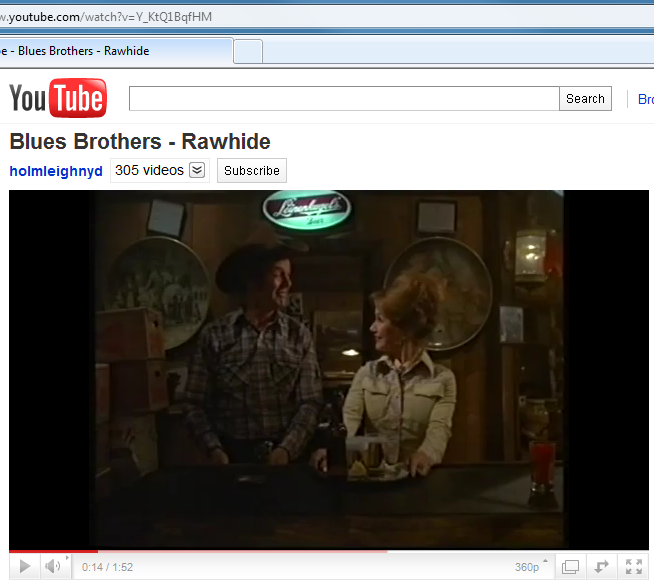
About 10 seconds into the clip, I do a bit of a double take. My wife and I both are big fans of the Leinenkugel Brewery in Chippewa Falls, Wisconsin, and so I am watching this clip, and I swear that I see the pretty unmistakable script Leinenkugel’s logo in the movie. Take a look at this screen capture 14 seconds in to the clip:

And I think that is very strange, since I never noticed it before, and I am the kind of person that notices things like that.

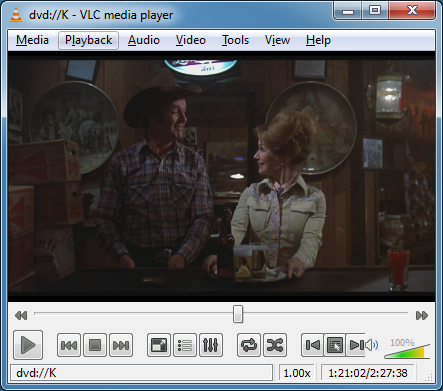
So I fire up the 25th Anniversary DVD of “The Blues Brothers”, and at about 1:21:02 into the extended version of the movie (side A), I see the following image:

Does anyone have any idea why my supposedly better widescreen edition of the movie does not have something that was in either a broadcast or pan-and-scan version of the movie??? It looks to me like for this scene, they just took the 4×3 image and chopped the top and bottom parts off to make it look widescreen, if this is the case that is disappointing. (I am not sure what to make of the IMDb technical specifications page for the movie, it lists both 1.33 and 1.85 ratios.)

BTW, happy belated 80th birthday to Leonard Nimoy. I used to be a huge Trek fan, but even I had no idea that William Shatner and Leonard Nimoy were born just 4 days apart of each other back on 1931. Fascinating…

Continuous Integration: More than just a toolset (CONDG meeting, March 24, 2011)

Jay Harris gave an excellent talk and demo on continuous integration at the Central Ohio .NET Developer Group meeting on March 24, 2011. The presentation was mostly talking about the concepts and pitfalls of continuous integration, but he did run through a quick installation and demo of a free continuous integration tool, and the demo gods smiled on Jay as it went pretty well.

Also, Shawn Wallace gave a quick presentation on the mysterious world of branching and merging, a subject that does not get nearly the attention that it deserves at most software companies.

On a personal note, my name was drawn as the first name on the door prizes, which meant that I could choose one of three unknown prizes. Of course, having the first choice, I drew the lemon of the lot (Windows Vista Ultimate, joyous day) and was embarrassed in front of the group. The second name drawn, a former co-worker of mine, also chose one of the unknown prizes, and got the best of the lot, a Microsoft Arc mouse. Oh well.

BTW, happy birthday to Steve Ballmer.

Hello, Let’s Talk! Peer-Peer Communication using GameKit, Sockets, and Bonjour. (CIDUG meeting, March 22, 2011)

Justin Munger gave a presentation on iPhone peer-to-peer communications at the Columbus iPhone Developer User Group on March 22, 2011. He had some great examples of applications he had put together that used GameKit and sockets to implement a simple chat type application.

I have been thinking of doing some peer-to-peer communcation in one of my applications, so his sample code should hopefully come in handy.

BTW, happy 80th birthday to the best… and, most dashing… starship captain… ever seen on the small or big screen, William Shatner. Make sure to read with the dramatic pauses for full effect.