The illusion…

I have heard it said that the greatest danger is the illusion that all is well. This is sort of pessimistic, and I am not a pessimistic person by nature.

And then I start looking through the code and see something like this:

public Guid AddSomething(Guid id1, Guid id2, bool useAlternateValue)
{
    // stuff removed from here
    // including the creation of the obj object, 
    // which conains a default and alternate value
 
    string s = "";
    if (useAlternateValue && (obj.alternateValue != null))
        s = obj.alternateValue;
    else if ((!useAlternateValue) && (obj.defaultValue != null))
        s = obj.defaultValue;
 
    // more stuff removed from here
}

One of the developers that I work with is confused by my hatred of compounding the not operator with ands, ors, and parentheses in decision statements, and of the use of the null object. This code appears to combine both of these things in a mishmash of non functional code.

Retrosheet.org play-by-play baseball data

I have thought for a long time that Retrosheet.org was a pretty neat web site with the potential for a ton of baseball information.

They have loads of stats on their site, but it can be hard to get at sometimes.  As a result, I thought I might do some coding against their data just for fun. (I am doing this mainly because I am bored, because the Steelers are not on TV here in Ohio today, and because cable does not carry the NFL Sunday Ticket.)

The first task is to take their event data files and get them into a format that can be easily read and parsed. There are zip files on the Retrosheet web site to download entire seasons worth of event data, just go to retrosheet.org, hover over Data downloads, and select Play-by-play files.

However, once you look at these event files, you discover that they may need a little interpreting to get them into a nicer format for study. Luckily, Tom Tippett, David Nichols, and David W. Smith wrote a DOS application that does this, you just need to run this BEVENT.EXE file on each of the event files.

And of course, I couldn’t simply do that, I had to write a VB.NET console application to create a batch file do automate this.

Imports System.IO
 
Module Module1
 
    Sub Main()
 
        Console.WriteLine("BEvent Helper")
        Console.Write("Enter the directory of your event files: ")
        Dim d As String = Console.ReadLine()
 
        If d.Trim = "" Or Not Directory.Exists(d) Then GoTo App_end
        If Right(d, 1) <> "\" Then d = d + "\"
 
        Dim eventFilenames As List(Of String)
        eventFilenames = Directory.GetFiles(d, "*.ev?").ToList
 
        Dim s, cmd As String
        Dim sw As StreamWriter = New StreamWriter(d + "BEventHelper.bat")
        For Each f In eventFilenames
            s = Path.GetFileName(f)
            cmd = "bevent.exe -f 0-96 -y " + Left(s, 4) + " " + s + " > " + s + ".csv"
            sw.WriteLine(cmd)
        Next
        sw.WriteLine("pause")
        sw.Close()
 
App_end:
        Console.WriteLine("Press any key to end application...")
        Console.ReadKey()
 
    End Sub
 
End Module

So what you do is download a season zip file (find them on the Play-by-Play Data Files page), unzip the files into a directory, download the bevent.zip file from the Software tools page, unzip it and place the BEVENT.EXE file into the directory with all the event files, run the console application and enter the directory name at the prompt, and when it is all said and done, you have a BEventHelper.bat file in the directory. Once this file is run, you will end up with CSV files that correspond to the event files.

In the next episode, I will begin to read in the data and crank out some preliminary statistics.

Disclaimer: The information used here was obtained free of charge from and is copyrighted by Retrosheet. Interested parties may contact Retrosheet at “www.retrosheet.org”.

Stanford iPhone App Programming lecture 16

Lecture 16 from the Stanford University iPhone Application Programming class was hosted by Alan Cannistraro. He covered using the audio APIs, playing back video content, displaying web content in UIWebView controls, and he talked about settings on the iPhone platform.

The APIs and controls Alan demonstrated were very simple, and really meant for basic usage only, which is fine for most applications. He did talk about and demonstrate how to use a settings plist bundle so that an application’s preferences show up in the device’s Settings application, which was mildly interesting to me.

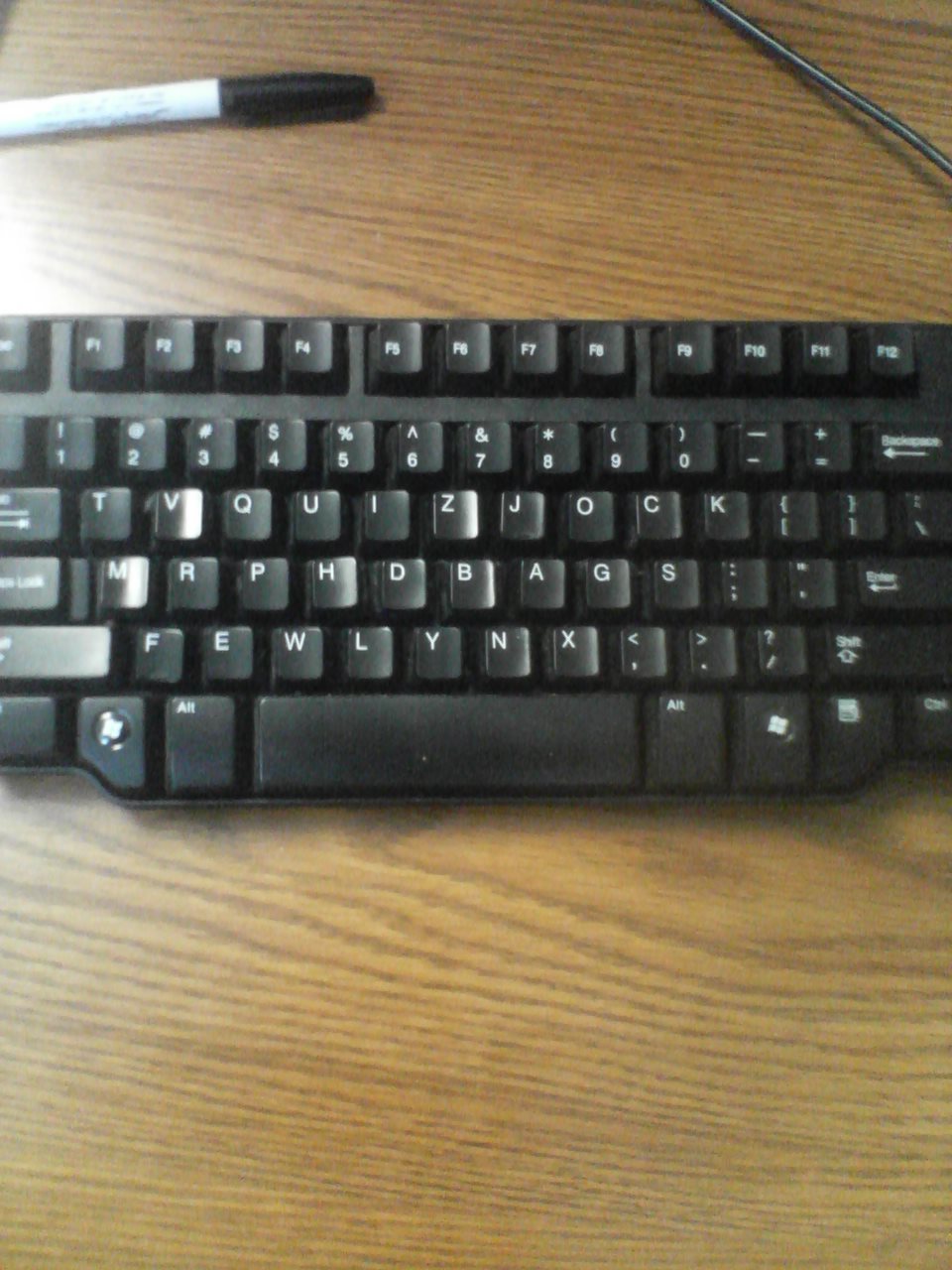
Some people use QWERTY, some Dvorak, but I use TVQUIZ

Are you looking for something silly and not too sinister to pull on a coworker who takes a week’s vacation on the beach while you are stuck in the office dealing with customers having issues with the vacationer’s product? And did I mention the week in question is one of the busiest weeks of the year for our company?

Here’s what I did to his keyboard:

0828091358

He had to rearrange a few of the keys to make it workable again, as this Dell keyboard has different shapes of the keycaps for the different rows of the keyboard. This took me about 10 minutes, and was much cheaper and quicker than wrapping everything in his office in aluminum foil.

Optimizing OpenGL for iPhone

A guest lecture for the Stanford University iPhone Application Programming class called “Optimizing OpenGL for iPhone” was hosted by Tim Omernick of ngmoco on May 22, 2009. Tim covered a lot of his thoughts on, shockingly enough, optimizing OpenGL ES code on the iPhone platform.

Since my familiarity with OpenGL is null, most of what he talked about was over my head. I do have some game ideas, and once I get motivated to look into how OpenGL works, this presentation should be helpful. Also, the fireworks demo application he showed was very fun to play with.

I wonder if the volume on this TV goes to 11…

Way back in 1984, I came to the enlightening realization that the bulk of my life is spent in the spaces between Spinal Tap moments…

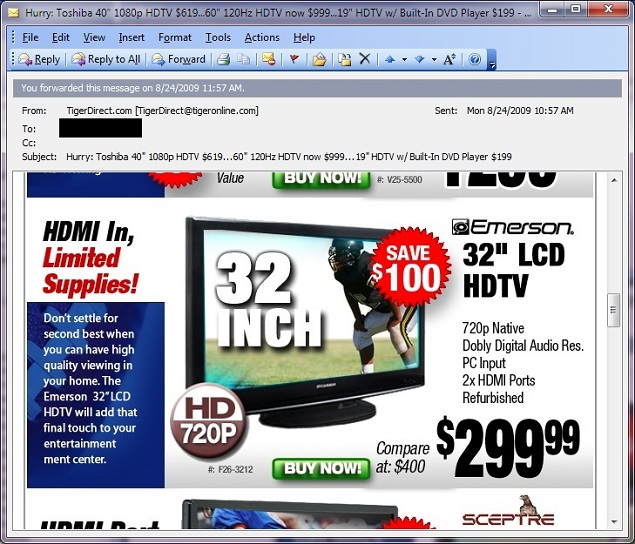
Check out part of this advertisement for a 32″ Emerson LCD HDTV that I received in my e-mail inbox from Tiger Direct:

tigerdirect

I have heard that Dobly audio is awesome. Too bad they weren’t selling a 32′ diagonal television for $299.99, I might have bought it.

My first foray into Code Golf

So I am poking around on Stack Overflow, trying to figure out a way for someone as stupid as me to actually move my reputation up, when I stumble on this post…

Code Golf: Duplicate Character Removal in String (EDIT: Sorry, I had to remove the link as the question was removed by Stack Overflow…)

This seemed simple enough, so here is my VB.NET console application code:

Module Module1
 
    Sub Main()
 
        Dim s As String = "nbHHkRvrXbvkn"
        Console.WriteLine("The original string is: " + s)
        For Each c In s : s = IIf(s.LastIndexOf(c) <> s.IndexOf(c), s.Replace(CStr(c), Nothing), s) : Next
        Console.WriteLine("The modified string is: " + s)
        Console.ReadKey()
 
    End Sub
 
End Module

The line that does all the work is 98 characters, including the spaces that the IDE automagically puts in there for me.

Anyone have any ideas on how to improve it in VB.NET?

Some more Monte Carlo experimentation

Disclaimer: I do not in any way, shape, or form condone gambling. This posting is for entertainment purposes only.

I saw this roulette story on The Daily WTF, and thought that it merited some good ole fashioned brute force computing:

Knocking Me Off The Perch

So here is the VB.NET console application code:

Module Module1
 
    Dim rand As Random
 
    Dim tableResults() As List(Of String)
    Dim theWheel() As String = {"G00", "B2", "R14", "B35", "R23", _
                                "B4", "R16", "B33", "R21", "B6", _
                                "R18", "B31", "R19", "B8", "R12", _
                                "B29", "R25", "B10", "R27", _
                                "G0", "R1", "B13", "R36", "B24", _
                                "R3", "B15", "R34", "B22", "R5", _
                                "B17", "R32", "B20", "R7", "B11", _
                                "R30", "B26", "R9", "B28"}
    Dim wheelCount As Integer
    Dim tableBetAmount() As Integer
    Dim tableBetColor() As String
    Dim tableLostLastTime() As String
 
    Dim tables, stake, bet, matches, goal, attempts As Integer
    Dim cancelBetAfterAWin As String
 
    Function GetASpin() As String
 
        Return theWheel(rand.Next(0, wheelCount))
 
    End Function
 
    Function GetABet(Optional ByVal bigBet As Boolean = False) As Integer
 
        Dim theBet As Integer
 
        If bigBet Then
            theBet = bet * 1.5
        Else
            theBet = bet
        End If
 
        If theBet > stake Then theBet = stake
 
        stake = stake - theBet
 
        Return theBet
 
    End Function
 
    Sub Main()
 
        Dim i, j As Integer
        Dim s As String
 
        rand = New Random
 
        Console.WriteLine("The Perch")
 
        Console.Write("How many tables to watch? (4) ")
        tables = Val(Console.ReadLine)
        If tables = 0 Then tables = 4
        ReDim tableResults(tables)
        ReDim tableBetAmount(tables)
        ReDim tableBetColor(tables)
        ReDim tableLostLastTime(tables)
 
        Dim stakeSave As Integer
 
        Console.Write("How many money to start with? (10) ")
        stakeSave = Val(Console.ReadLine)
        If stakeSave = 0 Then stakeSave = 10
 
        Console.Write("How many money to bet? (10) ")
        bet = Val(Console.ReadLine)
        If bet = 0 Then bet = 10
 
        Console.Write("How many times to hit a color before betting? (4) ")
        matches = Val(Console.ReadLine)
        If matches = 0 Then matches = 4
 
        Console.Write("What is your goal amount? (400) ")
        goal = Val(Console.ReadLine)
        If goal = 0 Then goal = 400
 
        Console.Write("How many times to run the simulation? (1000) ")
        attempts = Val(Console.ReadLine)
        If attempts = 0 Then attempts = 1000
 
        Console.Write("Cancel your bet after a win? (Y) ")
        s = Console.ReadLine.ToUpper.Trim
        If s = "" Then s = "Y"
        cancelBetAfterAWin = (s = "Y")
 
        Dim madeGoal As Integer = 0
 
        wheelCount = theWheel.Count
 
        Dim currAttempt As Integer
        Dim ctr As Integer
        Dim theSpin As String
        Dim spinsSeen As Integer
        Dim result As String
        For currAttempt = 1 To attempts
            ' initialize the table arrays
            stake = stakeSave
            For i = 0 To tables - 1
                tableResults(i) = New List(Of String)
                tableBetAmount(i) = 0
                tableLostLastTime(i) = ""
            Next
            ' initialize the lists
            For j = 1 To matches
                s = String.Format("{0,5}", j.ToString)
                For i = 0 To tables - 1
                    theSpin = GetASpin()
                    tableResults(i).Add(theSpin)
                    s = s + String.Format("{0,5}{1,-5}", "", theSpin)
                Next
                s = s + String.Format("{0,5}", stake.ToString)
                Console.WriteLine(s)
            Next
            spinsSeen = matches
            ' loop
            While (stake > 0 And stake < goal)
                ' place your bets
                For i = 0 To tables - 1
                    If tableLostLastTime(i) <> "" Then
                        ' see if this is the 1st time losing
                        If tableBetAmount(i) = bet Then
                            ' we lost last time out, automatically bet 1.5x
                            tableBetAmount(i) = GetABet(True)
                            tableBetColor(i) = tableLostLastTime(i)
                        Else
                            ' this is the 2nd time losing in a row, so stop betting
                            tableBetAmount(i) = 0
                            tableBetColor(i) = ""
                            tableLostLastTime(i) = ""
                        End If
                    Else
                        ' check to see if the colors match up
                        ctr = 0
                        For Each r In tableResults(i)
                            If Left(r, 1) = "B" Then ctr = ctr + 1
                        Next
                        If ctr = matches Then
                            ' it's coming up black, bet on red
                            tableBetAmount(i) = GetABet()
                            tableBetColor(i) = "R"
                            tableLostLastTime(i) = ""
                        End If
                        ctr = 0
                        For Each r In tableResults(i)
                            If Left(r, 1) = "R" Then ctr = ctr + 1
                        Next
                        If ctr = matches Then
                            ' it's coming up red, bet on black
                            tableBetAmount(i) = GetABet()
                            tableBetColor(i) = "B"
                            tableLostLastTime(i) = ""
                        End If
                    End If
                Next
                ' now spin for each of the tables
                spinsSeen = spinsSeen + 1
                s = String.Format("{0,5}", spinsSeen.ToString)
                For i = 0 To tables - 1
                    ' pop off the oldest spin for each table
                    tableResults(i).RemoveAt(0)
                    ' get a new spin for each table
                    theSpin = GetASpin()
                    tableResults(i).Add(theSpin)
                    If tableBetAmount(i) = 0 Then
                        s = s + String.Format("{0,5}{1,-5}", "", theSpin)
                    Else
                        s = s + String.Format("{0,5}{1,-5}", _
                                              tableBetAmount(i).ToString + _
                                              tableBetColor(i) + ">", theSpin)
                    End If
                    ' check for bets
                    If tableBetColor(i) <> "" Then
                        If Left(tableBetColor(i), 1) = Left(theSpin, 1) Then
                            ' winner
                            stake = stake + tableBetAmount(i) * 2
                            tableLostLastTime(i) = ""
                            If cancelBetAfterAWin Then
                                tableBetAmount(i) = 0
                                tableBetColor(i) = ""
                            End If
                        Else
                            tableLostLastTime(i) = tableBetColor(i)
                        End If
                    End If
                Next
                s = s + String.Format("{0,5}", stake.ToString)
                Console.WriteLine(s)
            End While
            If stake = 0 Then
                result = "Busted"
            Else
                madeGoal = madeGoal + 1
                result = "Won $" + stake.ToString
            End If
            Console.WriteLine("Spins seen: " + spinsSeen.ToString + _
                              "; Result: " + result)
        Next
 
        Console.WriteLine()
        Console.WriteLine("Total simulations: " + attempts.ToString)
        Console.WriteLine("Number of times goal was made: " + madeGoal.ToString)
 
        Console.WriteLine()
        Console.WriteLine("Strike any key to end the program")
        Console.ReadKey()
 
    End Sub
 
End Module

I kind of stumbled into something interesting here. I thought I had coded the application with the rules as described in the posting on The Daily WTF, but the results that I was seeing seemed out of whack to me.  I was running 1,000 simulations and coming up with about 300 times successfully reaching the goal. After I put in the code that breaks down the wheel, bet, and stake status on a spin-by-spin basis, I noticed that I was not cancelling the bet after a win. After fixing it up by adding the code to return to the perch after a winning bet (see the section above with the comment winner), all of a sudden the number of times reaching the goal went from 300 per thousand to 0 to 5 per thousand.

So that you can try it for yourself, I put in an option to control this parameter. From the results, it would appear that if you want to play this way, you should let the bets ride. (But notice that if your bets are riding and you get the required number red or black spins in a row, the bet that is riding could switch colors.)

iPhone Game Development presentation (CIDUG meeting, August 25, 2009)

Mac Liaw gave a presentation on iPhone game development at the Columbus iPhone Developer User Group on August 25, 2009. He mostly talked about how the iPhone is a very different platform to develop games for than the typical video game consoles.

I can sort of understand some of what he was talking about. In my experience developing games for the Atari 2600, a one or two person team can, with a good idea, produce a killer product. (Of course, the iPhone has at minimum 128 megabytes of RAM, while the Atari 2600 had 128 bytes of RAM, which is a topic for another blog post.) I have been kicking around a couple of ideas for games, now all I have to do is learn OpenGL ES. And find an artist who will work for peanuts.

RIP <blink>

I have just learned by accident that the venerable <blink> tag is now unsupported in Internet Explorer 8. Needless to say, I am guessing that my desire to usher the blink tag back into common use (circa 1994 or so) may not get off the ground now.