Posts tagged ‘Hardware’

I Want My MP3

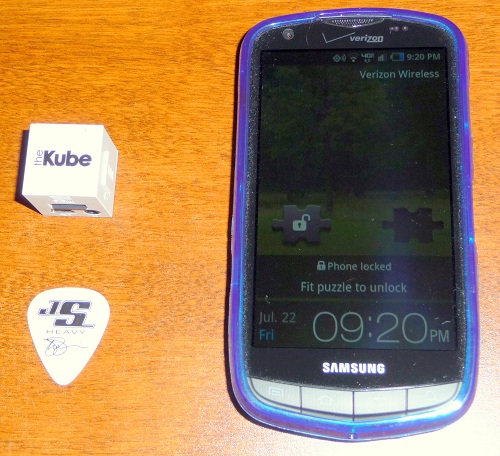
Please take a look at the two electronic devices in the following picture:

Electronic devices

One of these devices plays the MP3 files that I ripped in iTunes from CDs that I own, and one of these devices does not. (The Joe Satriani pick is included just to give you an idea of the size of the device on the left.)

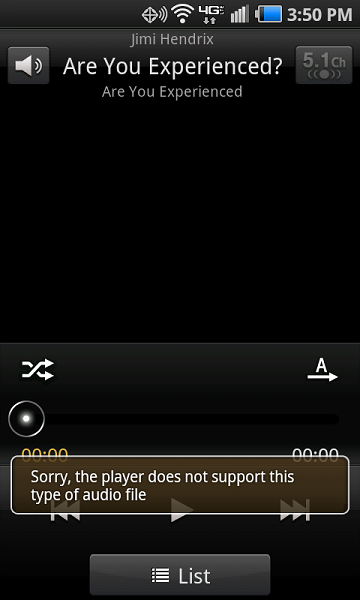
I think you can see where I am going here with this one. The cheapo flimsy extra-white Kube MP3 player on the left plays the MP3 files just swimmingly. Conversely, this is not exactly what I am expecting to see when I go to the music player on my shiny new Samsung Droid Charge from Verizon:

Android screen shot

Anybody have any ideas? If I reboot the device, the MP3 files play for a while, and then it goes back to the wonderful “Sorry, the player does not support this type of audio file” message. Also, I have no intention of uninstalling the Twitter app. I use the Twitter app and I am not sure if it would even go away if I tried to uninstall it. (I have tried repeatedly to uninstall “Let’s Golf” from the device, but alas each time I uninstall it, it shows back up again.)

If you would like to follow along with this on the Verizon support board, please feel free…

MP3 files will not play

Unfortunately, you would need to sign up for a forum account to contribute. If you have something to add, please feel free to click the Comment link just below this post.

BTW, Happy Pi Approximation Day. July 22, 22 divided by 7 is 3.142857 (decimal pattern then repeats), which is as close to pi as you can get with a fraction made up of a numerator and denominator that are reasonbly small.

Win32 EXE to service in Windows Server 2008

We had a server meltdown happen here earlier this week, and as part of the collateral damage, an automated order processing application that has been running since 2004 has been off-line. This application was written in VB6 with a minimal user interface, and as such, I have always remoted into the server, started the program up on the server and left it open, and then just closed my remote desktop application, which left the session open and running.

We wanted to change this to make it a bit more reliable, which means Windows service. Unfortunately, the application does not have the correct hooks in it that make it be able to be seen as a service. (I could create a service with the EXE name as the target, and the EXE would run when I started up the service, but it would soon crash as service manager could not find something it was looking for.)

After a little bit of digging, I found some suggestions on using the srvany.exe application as a shell to launch my application, and I must say it seems to work marvelously. Here is the link where I found the solution:

Application as a Service “srvany.exe” in Windows Server 2008

Here are the important steps from the article above (in case it relocates or disappears):

  1. At the time of this posting, there is no Windows Server 2008 Resource Kit Tools, so get the “srvany.exe ” from the “Windows Server 2003 Resource Kit Tools ” and copy it to a suitable location on your Win2008 server (e.g. C:\Windows\System32\ ).
  2. Use “sc ” to create a new service that launches “srvany ” (e.g. sc create MyService binPath= C:\Windows\System32\srvany.exe DisplayName= “My Custom Service” )
  3. Using RegEdit : create a “Parameters ” key for your service (e.g. HKEY_LOCAL_MACHINE\SYSTEM\CurrentControlSet\Services\MyService\Parameters\ )
  4. Using RegEdit : within the newly created “Parameters ” key , create a string value called “Application ” and enter the full path to the application you are wanting to run as a service. (No quotes required.)

In the article linked above, keep in mind that Parameters is misspelled at the end of item #3, I have corrected it in my item #3 above. Other than that, it seems to be working great.

Spell checkers should still work in other countries, shouldn’t they?

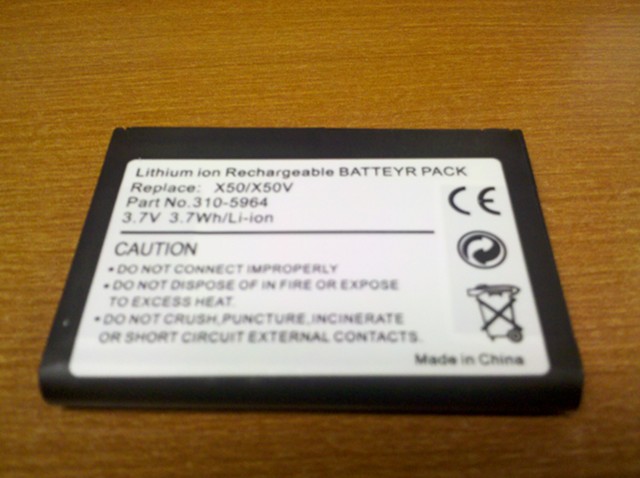
The rechargeable battery for my Dell Axim X51V was looking a bit puffy, so I ordered a replacement battery pack off of Amazon.

Batteyr Pack

Batteyr Pack

BTW, happy birthday to Niecy Nash. Tempestt is doing ok, but we miss the special energy and chemistry you had with your co-hosts.

Code 39

Did you ever get the dreaded “Windows cannot load the device driver for this hardware. The driver may be corrupted or missing. (Code 39)” message in your Device Manager for your DVD/CD-ROM drive?

This happened to a computer here at our office, and it did this for both the internal drive and for an external USB drive that we hooked up to it as well.

Well, to solve the problem, we found this link and ran a neat little automated program from Microsoft that went in and fixed up the drivers for both the internal and external drives.

Your CD or DVD drive can’t read or write media

Very cool. This was way easier than some of the other solutions that we were seeing.

Droid tethering with PdaNet

By the way, I forgot to mention that while John and I were on our Codestock trip, I got tired of hoping beyond hope that the 2.2 Froyo update would appear on my Verizon Droid and purchased a license for the PdaNet software for Android. (I have a great fear of open wi-fi access points.)

It worked flawlessly with both the Mac OS X and Windows 7 operating systems on my BootCamp MacBook Pro. Nice job June Fabrics. Here is a link to their Android product:

PdaNet Android tethering

The demo of the software will run for 14 days, and then it will start blocking secure web sites. Also, you install a client application on your Windows or Macintosh computer that you need to run, along with running the PdaNet application on your device and activating the USB or Bluetooth mode. I did not try the Bluetooth mode, I just brought my Droid USB cable and communicated that way.

I highly recommend the software for Droid owners who need an internet connection on their laptop while on the go.

Windows 7 runs extremely hot on MacBook Pro with Boot Camp 3.1

I was having some issues with the Windows XP installation in Boot Camp on my MacBook Pro, so I decided to turn it into a Windows 7 machine.

Unfortunately, the machine ended up running incredibly hot, even though I was booting it up and not really doing anything processing intensive on the machine.

As it turns out, I found that other users had some luck by enabling the Powermizer mode of their Nvidia GeForce 8600M GT internal graphics card. This would scale back the GPU processing and allow the idle fan speed of about 2000 RPM to properly cool the MacBook Pro.

As is the case with any registry hacks, edits or low level driver manipulation, you can quite easily do more harm than good. Please follow my advice at your own risk.

Alas, there is no setting that I could find for this in the newest 64-bit Windows drivers for the Nvidia GeForce 8600M GT internal graphics card in my MacBook Pro.  After a little digging, I found that I could add the following DWORD values to my registry to enable a lower power mode:

  • PerfLevelSvc (0×00003333)
  • PowerMizerEnable (0×00000001)
  • PowerMizerLevel (0×00000001)
  • PowerMizerLevelAC (0×00000001)

The key that these values were added to was HKEY_LOCAL_MACHINE\SYSTEM\CurrentControlSet\Control\Video\{FIND_YOUR_GUID}\0000. You will have to find the GUID to use in the key above, just look at all of the 0000 keys inside of the Video key for the one that has a whole mess of values in the right hand pane, this will likely be it.

E-Tech Sony replacement keyboard woes

For many years, I faithfully used a Sony Vaio VGN-FS742/W notebook computer. This computer was an absolute workhorse, and I never had a problem with it, despite using it heavily for software development as well as the usual e-mail and web surfing activities.

After I let my brother and his family use the computer, an unfortunate incident occurred that involved the cosmetic destruction of the B key on the keyboard. The key worked, but the tabs that held the platform that the keycap sits on broke off, so the B key stuck out higher than the rest of the keys on the keyboard. Unsightly, yes, but still functional.

Alas, my brother had to have a functional and flat keyboard, so I began the process of looking to find a replacement keyboard for a computer that was 5+ years old. The Sony part number for this keyboard is 147915321, and it must be the same keyboard on all VGN-FS series Vaio notebooks.

The first thing that I found was that I was more than likely going to have to buy a used keyboard and hope that it worked just fine. So I ordered one from the E-Tech eStore. The keyboard arrived well packaged, and after I installed it, I tested every single key on the keyboard and found that all of the keys worked except for the V key.

At this point, I should have requested an RMA for a refund, but I mistakenly requested a replacement. After sending the first keyboard back and getting the second keyboard, the situation got worse, as on the 2nd keyboard, quite a few more keys were not working. And of course, at this point my return request for a refund was rejected, as E-Tech is claiming that their keyboards are all tested, and that I check my equipment for failure.

So, as a response, I created this little rant video showing that my equipment is fine:

httpv://www.youtube.com/watch?v=A_c1hBj2MG0

As I said in the video, I cannot see how they could have tested the keyboard fully, since my hardware seems to work fine with my old keyboard with the B key tabs broken. I am guessing that their replacement keyboards are all pulls from computers that are dropped off at the computer recycling, and for the particular keyboards that I received, the reason the computer was at the recycling center was that some of the keys stopped working.

By the way, congrats to the Ohio Bobcats.  Big win last night.

UPDATE: I still haven’t heard anything from E-Tech eStore (if you click on the link, try not to get creeped out by the ad on the right with the weirdly moving eyes) regarding my appeal of their RMA request denial. Thanks to Tai Tran (eBay seller ID ttni) who came through with a perfectly working replacement keyboard.

Sansa e250 database rebuild

For some reason, my Sandisk Sansa e250 MP3 player was stubbornly refusing to acknowledge the music that I was copying to it. I tried just about everything I could think of short of formatting the device to get it to see my folders in the Music folder. My device has the latest version 1 firmware upgrade, and I have tried to use both MSC and MTP mode to copy folders to the device, all to no avail.

Finally, I found out that I could force the device to do a database rebuild by doing the following steps, which should work on any Sansa e200 series MP3 player with the version 1 firmware:  (WARNING:  Please do not do this if you are worried about making your device inoperable.  There is always a risk that this will happen when you start futzing with the system files.)

  • Go into the Settings screen and scroll to USB mode, and set it to MSC
  • Connect the device to the computer
  • Once the device mounts as a drive on your computer, browse to the device, look for the System folder, and the Data folder in that folder
  • Delete the file called PP5000.DAT
  • Disconnect the device

Once you disconnect, the device will restart, and it should refresh the database. If you prefer MTP mode, make sure to go back into the settings to change it back.