Posts tagged ‘Android’

I Want My MP3 (Reprise)

Well, I gave in and uninstalled the official Twitter app from the Droid Charge, and what do you know, my MP3s play. I can now enjoy my ringtone of “The Analog Kid”.

I Want My MP3

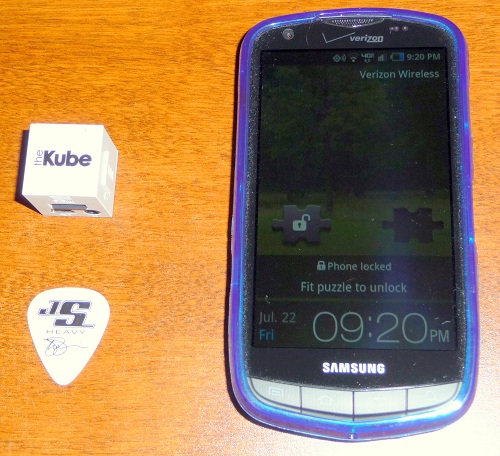
Please take a look at the two electronic devices in the following picture:

Electronic devices

One of these devices plays the MP3 files that I ripped in iTunes from CDs that I own, and one of these devices does not. (The Joe Satriani pick is included just to give you an idea of the size of the device on the left.)

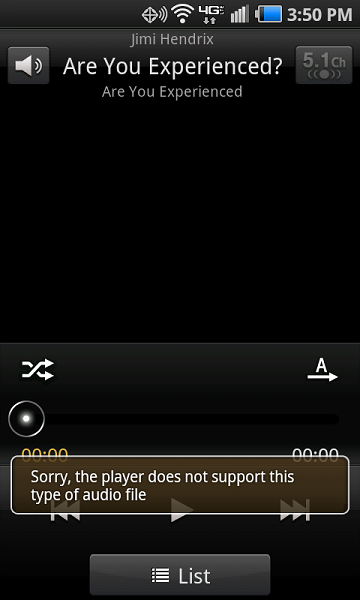
I think you can see where I am going here with this one. The cheapo flimsy extra-white Kube MP3 player on the left plays the MP3 files just swimmingly. Conversely, this is not exactly what I am expecting to see when I go to the music player on my shiny new Samsung Droid Charge from Verizon:

Android screen shot

Anybody have any ideas? If I reboot the device, the MP3 files play for a while, and then it goes back to the wonderful “Sorry, the player does not support this type of audio file” message. Also, I have no intention of uninstalling the Twitter app. I use the Twitter app and I am not sure if it would even go away if I tried to uninstall it. (I have tried repeatedly to uninstall “Let’s Golf” from the device, but alas each time I uninstall it, it shows back up again.)

If you would like to follow along with this on the Verizon support board, please feel free…

MP3 files will not play

Unfortunately, you would need to sign up for a forum account to contribute. If you have something to add, please feel free to click the Comment link just below this post.

BTW, Happy Pi Approximation Day. July 22, 22 divided by 7 is 3.142857 (decimal pattern then repeats), which is as close to pi as you can get with a fraction made up of a numerator and denominator that are reasonbly small.

Android layouts web site

A friend of mine has created a new web site where Android developers can share their XML layouts that they have put together for Android applications. Here is the URL, be sure to check it out:

Android Layouts

Droid tethering with PdaNet

By the way, I forgot to mention that while John and I were on our Codestock trip, I got tired of hoping beyond hope that the 2.2 Froyo update would appear on my Verizon Droid and purchased a license for the PdaNet software for Android. (I have a great fear of open wi-fi access points.)

It worked flawlessly with both the Mac OS X and Windows 7 operating systems on my BootCamp MacBook Pro. Nice job June Fabrics. Here is a link to their Android product:

PdaNet Android tethering

The demo of the software will run for 14 days, and then it will start blocking secure web sites. Also, you install a client application on your Windows or Macintosh computer that you need to run, along with running the PdaNet application on your device and activating the USB or Bluetooth mode. I did not try the Bluetooth mode, I just brought my Droid USB cable and communicated that way.

I highly recommend the software for Droid owners who need an internet connection on their laptop while on the go.

My Tracks Android app review

I saw a news blurb a while back about this new app from the Google folks called My Tracks. I downloaded it to my Droid right away, but really didn’t try it out until today.

So I decided to try and use the application while walking one of my dogs. The navigation around the application is pretty simple, and the track recording seemed to work very well. After I got back from the walk, I was able to see the path that I walked along with a bunch of statistics about it.

The program has upload options to send to Google Docs and Google Maps, so I tried them both at first. This first upload did complete to my Google Docs, but I did have a bit of trouble when it tried to upload the track to Google Maps. The first few times I tried it, I got some miscellaneous errors, such as an authentication error and other nondescript messages. Finally it did go through, and the track then was showing up on the My Maps page of Google Maps.

Even though this app is in the early stages of development, I think it rates quite well. I would give it a 4 star rating, if only because I had some trouble getting the Google Maps upload working.

If you can find it in your heart to help out a fellow nerd, please help out Shawn Powers, he is having a tough go of it. Here are the details:

Urgent: Help Shawn Powers & Family

Oh, and I hope everyone out there had a good Martin Luther King Day.

Two weeks with Droid

So far, I haven’t seen really anything yet from the Droid that is going to cause me to change my 4-and-a-half star rating. Especially after I actually found the question mark key on the slide out keyboard. (It’s just to the right of the L key and just above the period key, where the semicolon key would be on a normal QWERTY or TVQUIZ keyboard.)

On the plus side of the ledger, I traveled with the phone for the first time today, and it worked flawlessly on my drive to visit the folks. The navigation application is so much superior to my trusty old Alpine Blackbird GPS that it isn’t even funny.

I am not at all impressed with the battery life, however. During the week, I don’t think that I am using it excessively, but by the time I get home from work, the freshly charged battery is down to about 30% or 40%. This would seem to indicate to me that I better not try to squeeze two days worth of usage out of it before recharging. The problem here I think is that I would like the wi-fi to be on so that I am not burning through my 5GB unlimited data plan, but it is probably draining the battery quite a bit. More experimentation with the device is called for here.

On the application front, I have only downloaded free apps so far, and there are quite a few good ones. I do like the game Jewels, a Bejeweled clone. I wish I could figure out how to use Google Sky Map, it seems to be so jittery that I can’t get it to behave long enough to try and find anything.

If anyone has any suggestions about how to maximize battery life, please let me know.

Motorola Droid first impressions

It was well past the time to replace my aging, not-quite-functioning-correctly LG enV phone that I have been using for the past 3 years or so. I have been keeping an eye out for an interesting phone to upgrade to, as I wanted to stay with Verizon Wireless.

My wife and I were just about to jump ship to a rival carrier due to a significant lack of good phones offered by Verizon, when the iDon’t commercials with the happy iPod-type music debuted. Instantly entranced by the prospect of a shiny new alternative to the iPhone and Crackberry drones, we decided to take the plunge and switch to the Droid phone when it came out.

I went to my local Verizon store on the morning of November 6th, and after a wait of about an hour, my friendly sales rep Mike had set me up with 2 shiny new Android phones.

Two thumbs up, 4-and-a-half star rating

I must say that I am thoroughly impressed with the fit and finish of the phone, and especially with all of the work that has gone into the Android 2.0 operating system. They have really done a nice job of making the operating system easy to use and very functional.

Once I put in my Gmail account information, it synchronized all of the information that I have put into my Gmail contacts and calendar. I now have all of my contacts instantly on my new phone, which has all of the options that you would expect it to have (along with quite a few features that you wish you had thought of).

Among the built-in apps, I especially like the Maps application, which provides both mapping and navigation information. I have not played with the navigation much, but it appeared that you can use the navigation along with a street view layer if you want. This is very cool. (I do need to get some kind of car dock/charger for this purpose, as I can see the screen turning off as a big problem, and I’m sure the battery runs down quite quickly when using the GPS receiver along with the 3G radio.)

I do have a few negatives about the phone, these largely mirror the thoughts of some of the other reviews that I have read. This is a heavy device compared to other devices. The camera takes utterly craptastic photos indoors, even with the flash turned on. And the volume of the ringer and notifications seems a bit weak to me. (Oh, and by the way, when you use the slide out keyboard, where is the question mark character???)

But all-in-all, I give this phone 2 huge thumbs up, or a 4.5 out of 5 star rating. Good job Verizon, Motorola, and Google, you have retained me as a customer for at least another 2 years.